Welcome to the October 2026 Flex Insider!
SmartSDR, AetherSDR, and the Open API
CTO Update, October 2026
Many of you have asked where FlexRadio stands on AetherSDR, RimuSDR and other open-source clients for FlexRadio transceivers. The short answer: we’re glad it exists, we’re going to keep building SmartSDR, and we want to be clear about how support works when you use a third-party client.
Built for Exactly This
When we designed the SmartSDR architecture, we made a deliberate choice: the radio does the heavy lifting. Receive and transmit signal processing, demodulation, filtering, and the panadapter and waterfall data are all generated inside the radio. A client is a window into the radio, connected over a published network API.
One of the key reasons for that choice is how easily new features reach every client. When we add a capability in the radio, such as a new DSP noise reduction algorithm, any client can offer it just by adding a button to turn it on. There are no real-time DSP routines to move into each client, so the feature works the same no matter which client you use. Capabilities built inside a single client, as AetherSDR and some other clients do, live only in that client and aren’t easily carried over to others.
That choice is why you can run the same radio from SmartSDR for Windows, a Maestro, or across the Internet with SmartLink. It’s also why we published the API. We wanted developers to build things we hadn’t thought of, and over the years they have: loggers, station controllers, amplifier and antenna integrations, and complete alternative clients.
AetherSDR, pronounced etherSDR, is the most ambitious of those so far. Led by Jeremy Fielder, KK7GWY and built by a sizable community of contributors, it runs natively on Linux, macOS, and Windows and is released as open source under the GPL. We recognized Jeremy with our Developer of the Year award because this is exactly what an open API is for. AetherSDR can do what it does because the radio exposes its capabilities through that API, and seeing someone push it this hard is a good day for us.
To be clear, AetherSDR is an independent project. It isn’t a FlexRadio product, and the award is recognition, not an endorsement or a support commitment.
SmartSDR Is Still Our Client
FlexRadio will continue to develop, test, and support SmartSDR. It remains the free client for every FlexRadio transceiver. Here’s what that means in practice:
- New features appear in SmartSDR first. When we add a capability to the radio, we build client support for it in the same release. A radio feature with no way to control it isn’t much use, so SmartSDR is where new capabilities are delivered.
- SmartSDR is our reference client. Every firmware release is tested against it, and it’s what our engineering and support teams use every day.
- SmartSDR+ features are delivered through SmartSDR.
Some of you remember PowerSDR. This is not that. When PowerSDR moved to the community, we had stopped all development on that platform. Here, we are continuing active development of both the radio firmware and SmartSDR.
We’ll also be candid. An open-source project with dozens of contributors can add features at a pace a company our size won’t match one-for-one, and we aren’t going to try. Our engineering focus is the radio and the capabilities that can only be built there, such as receiver resources, transmit processing, and SmartSignal™ adaptive predistortion. When good ideas turn up, whether in AetherSDR, another project, or your feature requests, we pay attention.
How Support Works with Third-Party Clients
FlexRadio supports our radios, our firmware, and our software. We don’t provide direct support for AetherSDR or other third-party clients. If you contact us about a problem you see in AetherSDR, here’s what to expect:
- We’ll ask you to try the same thing in SmartSDR, using the version that matches your radio’s firmware.
- If the problem also happens in SmartSDR, it’s ours. We’ll log it as a bug and work it like any other.
- If it only happens in AetherSDR, the best place to report it is the AetherSDR project on GitHub, where its developers track issues.
This isn’t about discouraging anyone from using AetherSDR. We can only diagnose code we wrote and test, and SmartSDR gives all of us a known reference point. Many of you already do this on your own and post the results in the community, which helps everyone.
If you run Linux or macOS and don’t have a Windows PC handy for SmartSDR, tell support up front. We’ll work with you to determine whether the radio itself is behaving correctly.
The Bottom Line
Use the client that works best for you. The API is open, it’s staying open, and we’re glad people are using it to build new interfaces. FlexRadio will keep building SmartSDR, new radio features will show up there first, and SmartSDR is the reference we support against. We’ll keep watching how the client landscape evolves, and if our approach changes, you’ll hear it from us here first.
73,
Steve, N5AC
CTO
SmartSDR v4.3 Coming Soon
Targeted release: October 13, 2026 (subject to change if required)
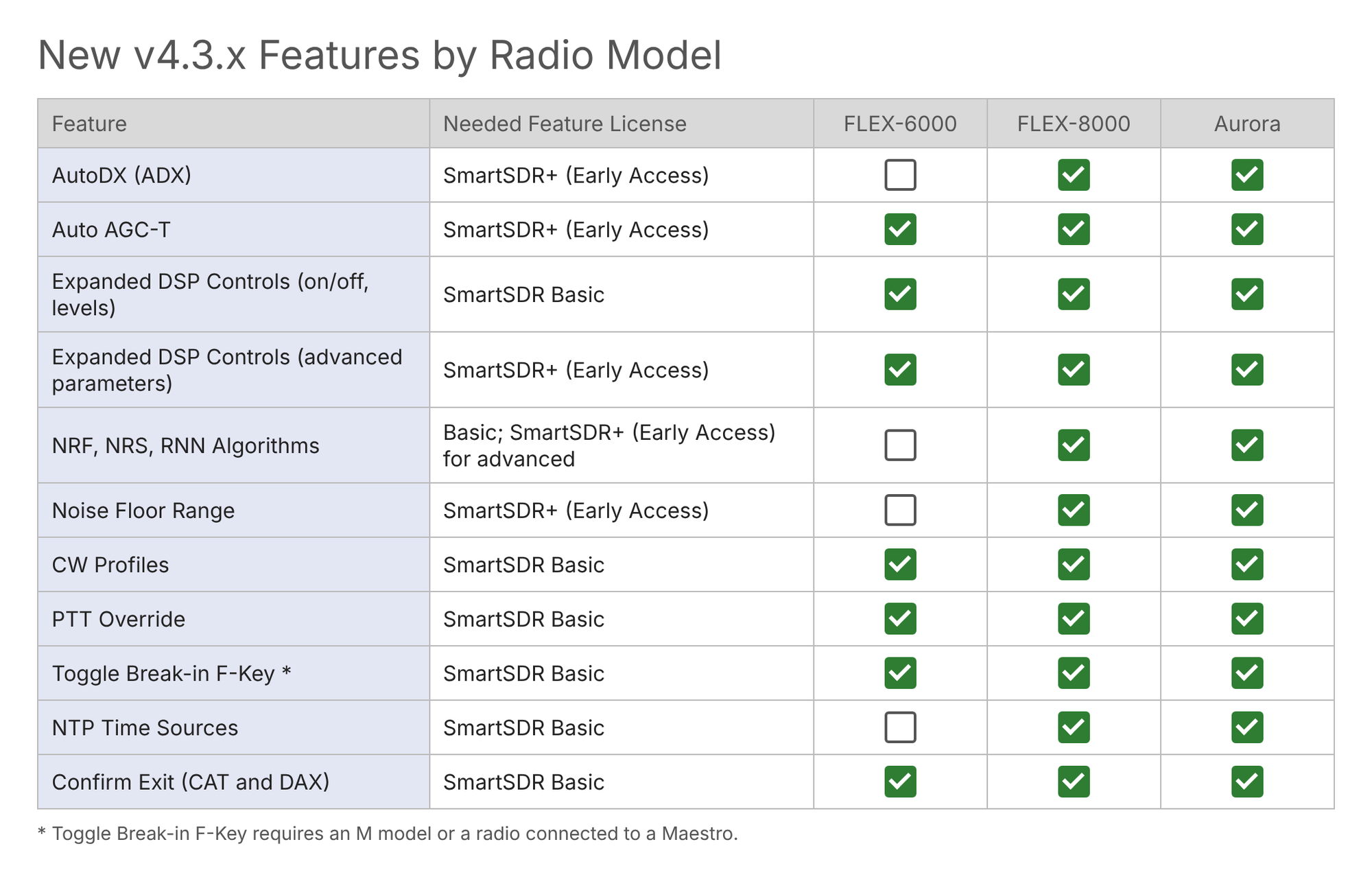
SmartSDR v4.3 brings 9 new features for FLEX-8000 and Aurora and updates for FLEX-6000. The headliner is AutoDX, which decodes CW and can automatically work a split pileup for you (SmartSDR+ Early Access, FLEX-8000 and Aurora). Auto AGC-T keeps your AGC Threshold set automatically as conditions change (SmartSDR+ Early Access). Everyone also gets CW Profiles, a new DSP Controls Panel and dozens of bug fixes. SmartSignal is now out of beta.
Heads up: hardware PTT now transmits your selected audio source, including DAX.
Watch the full walkthrough: https://youtu.be/lY0dJjxILY4
Upgrading from SmartSDR Basic to SmartSDR+ or SmartSDR+ Early Access
Every FLEX‑6000, FLEX‑8000 and Aurora radio includes a free SmartSDR v4 Basic license, which covers bug fixes and select minor enhancements. New major features require a SmartSDR+ or SmartSDR+ Early Access license. The upgrade is done right from inside SmartSDR, and the license is applied to your radio.
Choose your tier
- SmartSDR+ (365 days): Unlocks every new feature released during your 365‑day window. Those features stay with the radio permanently, even after the license expires. You also receive all previous features. New features are available after the expiration of the Early Access period (about 30 days after the EA release).
- SmartSDR+ Early Access (365 days): Everything in SmartSDR+, plus new features roughly 30 days before general availability.
Pick one or the other, not both.
Before you start
- Your radio must be running SmartSDR v4 (Basic).
- Your radio needs internet access to validate the license.
From a Windows PC
- Start SmartSDR.
- Open Radio Settings.
- Select the Radio tab.
- Click either Get SmartSDR+ or Get Early Access.
- Complete the upgrade. The radio validates the new license with the FlexRadio License Server.
From a Maestro or M model
- Connect your Maestro to your radio, or on an M model use the front screen.
- Select Menu.
- Select the Radio tab on the left side.
- Scroll down to License Info.
- Scan the QR code with your phone and follow the instructions there.
Good to know
- Licensed features belong to the radio and stay with it.
- Upgrading from v1 or v2? SmartLink (v2) and MultiFlex (v3) are not included in Basic for those radios. A SmartSDR+ or Early Access license restores them.
- Some features are hardware dependent (some are FLEX‑8000/Aurora series only). Check the release notes first.
Genius Line Service Update
4O3A, the manufacturer of your Genius line products, has recently appointed N7HQ Labs as its newest Manufacturer Authorized North American Service Center.
This service center is led by Dan Quigley, N7HQ, a long-time FlexRadio employee with years of experience with Genius line products. In light of this, FlexRadio will be contracting with N7HQ for all Genius line repairs for its North American customers.
If you purchased a Genius line product from FlexRadio over the years, your process is still the same for support and service: open a HelpDesk ticket and a seamless customer support experience will get underway.
If your hardware is out of warranty, you can also open a ticket directly with N7HQ Labs at https://www.n7hq-labs.com/
Free Club Presentations: Bring FlexRadio to Your Club
We have two unique and engaging talks that we are excited to deliver to your club members. Each presentation is delivered live (online) by Mike, VA3MW, directly to your group. No travel required, no cost to your club.
1. Aurora 500-Watt Transceiver
Mike covers the new Aurora HF Series. A platform that integrates a high-efficiency 500W transmitter, amplifier, tuner, and power supply into a single compact unit. Learn how Aurora delivers reduced heat, lower power input, and full network control while keeping the familiar operating experience FlexRadio users appreciate. A big step forward in the evolution of HF/6m transceivers.
2. Not Your Dad’s HF Radio (Most Popular)
Our most requested presentation. This talk explores the differences between traditional HF radio using Superheterodyne Receivers and today’s Software Defined Radios, showcasing the real-world advantages of modern SDR technology. A perfect introduction for clubs with mixed experience levels.
Ready to schedule? Send us your preferred dates and times and the talk you are interested in, and we will get it on the calendar for the coming season.
Event Calendar: Find Us on the Road
- October 16–18, 2026: Pacificon 2026, San Ramon Marriott, 2600 Bishop Drive, San Ramon, CA 94583
Contact Us
If you need to reach out to us, you can find us at:
- Website: www.flexradio.com
- Email: hams@flexradio.com